Micro-Alerts
Micro-Alerts allow you to set up notifications related to the revision of a specific passage in a document.
Set a Micro-Alert
-
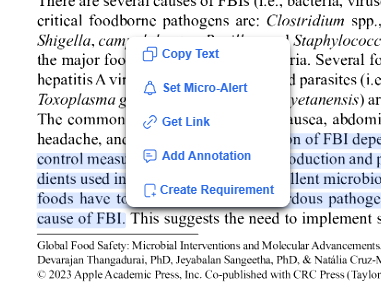
While viewing the document, highlight the text you want to be alerted about. Once highlighted, a toolbar will display, select Set Micro-Alert.
-
-
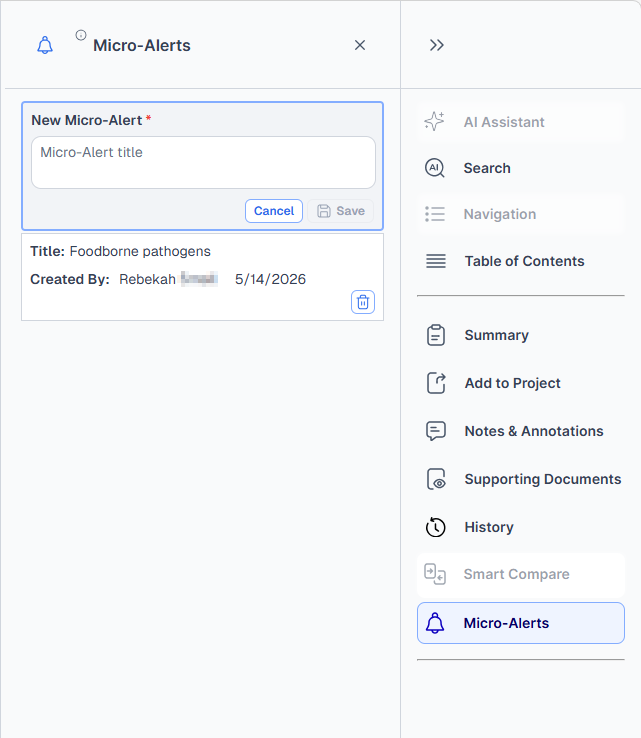
A new Micro-Alert will display on the right and prompt you to enter a title.
-
-
Once the Micro-Alert has a title and has been saved, a bell icon will display next to the selected text and the alert will be visible in the list.
Manage your Micro-Alerts
Micro-Alerts can be managed in two locations: While viewing a Document or on the My Workspaces page.
Delete a Micro-Alert
To permanently delete a Micro-Alert:
-
Open the Micro-Alerts tab while viewing a document.
-
Then click the trash can icon to delete that Micro-Alert.
Disable a Micro-Alert (Non-Destructive)
To disable a Micro-Alert:
-
On the My Workspaces page, open the Micro-Alerts tab.
-
Toggle the button under Micro-Alert status to turn the alert on or off.
-
This will disable the email alerts but the micro-alert will still be visible on this page, so you can turn it back on if need be.