Usage Reporting Administrators can access a comprehensive list of their account(s)' simultaneous user licenses using the Active License Usage page. This page is available via the Admin= menu, under theManage Platform heading.
View Active/Allocated Licenses
-
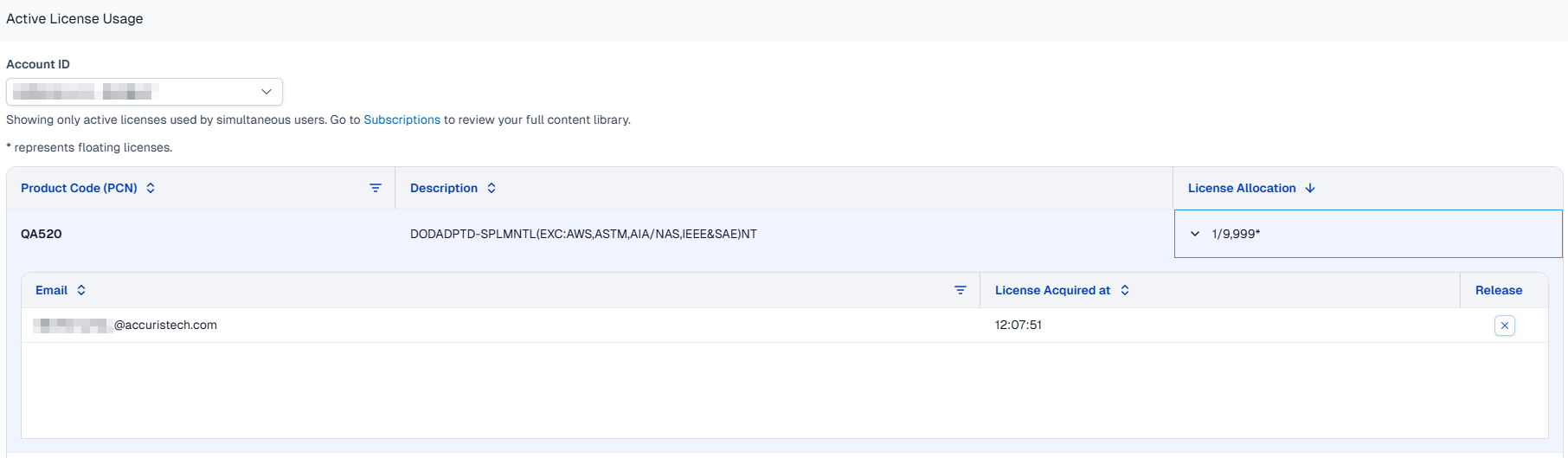
Select the Account containing the licenses you want to view.
-
Once an account is selected the page displays all Product Code Numbers (PCNs), their descriptions, number of licenses in use, and the total allocated licenses per PCN for that account.
-
Click on the arrow next to the License Allocation ratio. (Used/Unused) to view the list of active users, and the time stamp of when they acquired the license.
Free a License
-
After following the steps above to view the list of active users, use the search or sorting options to find and select a user to release.
-
At the right end of that user's row click the X in the Release column.
Note: The user whose license has been revoked will still be able to view the document for a short period of time. After about five minutes, if they still have the document open, the platform will refresh and attempt to assign a new license to the document. In this case, if a license is available, they will acquire it and will not experience an interruption. If there are no available licenses they will see Warning 3510.