Managing Document Notes
You must be an Account Notes administrator to view this page.
Using the Document Notes page
On the left panel of application links, click  (Administrator), and then
click Document Notes.
(Administrator), and then
click Document Notes.
The Document Notes page enables the Engineering Workbench administrator to review and manage document notes that have been added to a document. An Account Notes administrator creates and adds a note to a document to alert users to organization-specific information related to that document. Each document note is associated with a document or document family. Document notes are visible to all users of a subaccount when they see the document in their search results, or when they view a document with a note attached. You can add a note to some, but not all, documents .
The Document Note page looks like this:
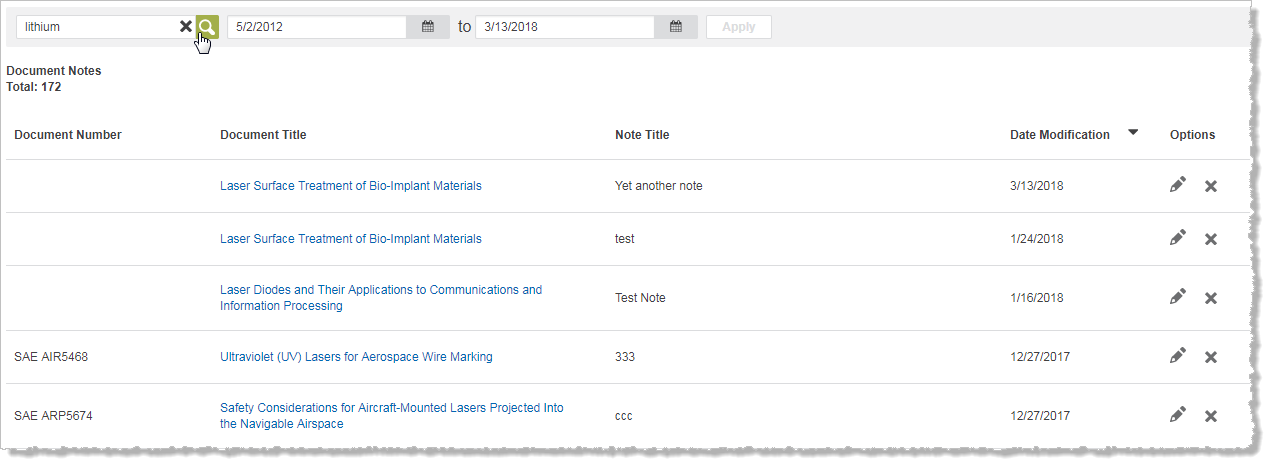
To perform a search in your collection of notes, type in the search
box, and then click  .
The results display notes that match your search in the title and the
content of the note.
.
The results display notes that match your search in the title and the
content of the note.
To filter notes by a date window, select the start and end date, and then click Apply.
To export notes to a file, click Download Results.
The following columns can appear in the table:
- Document Number displays the document number of the document linked to a note
- Document Title displays the title of a document with a document note. Click the document title to display the document.
- NoteTitle displays the title of a note.
- Date Modified displays the date when you added or revised a note.
- In Options, click
 to
edit a note, or click
to
edit a note, or click  to delete it