My Wish List
To display the My Wish List page, click
 on the Engineering Workbench menu, click My
Settings, and then click
My Wish List.
on the Engineering Workbench menu, click My
Settings, and then click
My Wish List.
On this page, you can check the progress of and view the status of all the documents you have added to your wish list.
When you submit a query in Engineering Workbench, you might encounter documents in your search results that are not part of your company's subscription. You can add a document that is not part of your company's subscription to your wish list. You can then contact your Engineering Workbench administrator to address these requests.
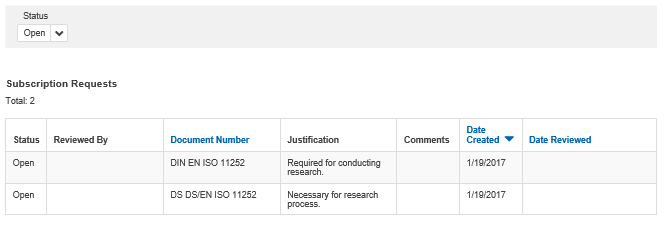
The My Wish List page looks like this:
Click (Status) to select one of the
following:
(Status) to select one of the
following:
- All, to view all your subscription requests.
- Open, to view only your open requests.
- Closed, to view only your closed requests.
To sort the Document Number, Date Created, and Date Reviewed columns, click the column header.
The following columns can appear in the table:
- Status can be Open or Closed.
- Reviewed By displays the name of the administrator who reviewed your request.
- Document Number displays the number affiliated with the document that you requested.
- Justification displays the reasons that you provide for making a request.
- Comments displays any comments provided by the administrator.
- Date Created displays the date when you made your request.
- Date Reviewed displays the date when the administrator reviewed your request.