Active License Usage
Engineering Workbench Usage Reporting Administrators can access a comprehensive list of their account(s)' simultaneous user licenses information using the Active License usage page. This page is available via the Administration menu, under Manage Platform.
View Active/Allocated Licenses
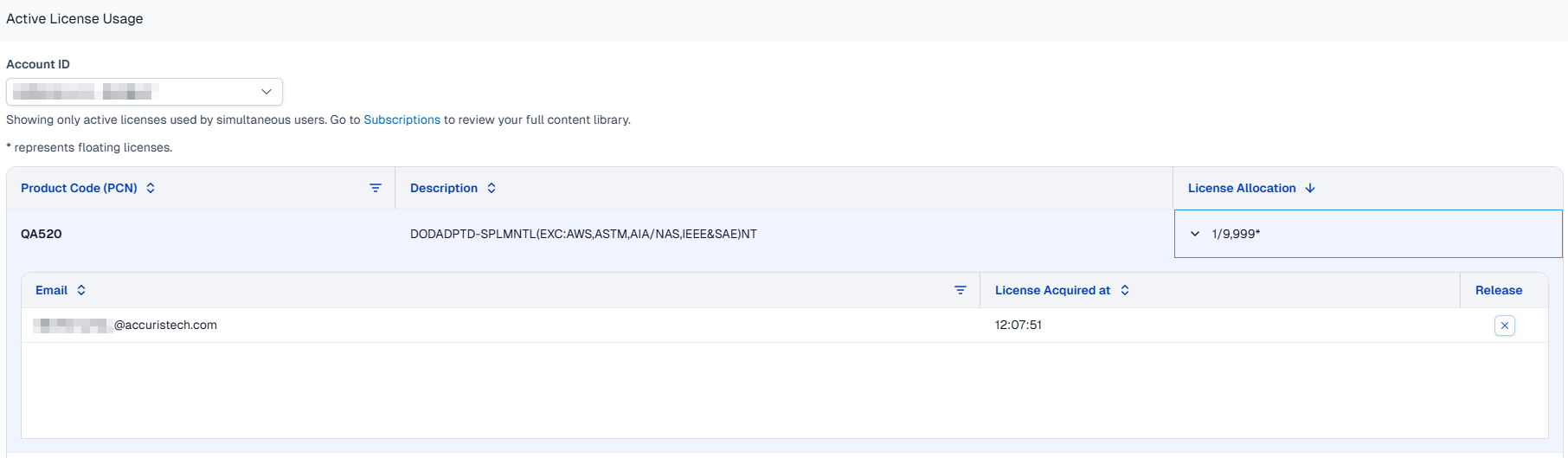
First, select which Account ID usage you want to open, once selected the page displays all content Product Code Numbers (PCNs), their descriptions, number of licenses in use, and the total allocated licenses per PCN.
Expand any PCN row to view the list of user emails, and the time stamp of when they acquired the license.
Free a License
With the PCN section expanded, select a user to release and at the right end of that row click the X in the Release column. 
It is expected that the user whose license has been released will still be able to view the document for a short period of time. After about five minutes, if they still have the document open, the platform will refresh and attempt to assign a new license to the document. In this case if licenses are available, it will acquire it and they will not experience an interruption. If there are no available licenses they will see Warning 3510.