Handling External Sources
You must be a Knowledge Collection administrator to view this page.
To display the Handling External Sources page
On the left panel of application links, click  (Administrator), and then
click Handling External Sources.
(Administrator), and then
click Handling External Sources.
When users are working with Engineering Workbench , they might
see  next to some documents. This icon means that to view this document, a
subscription or purchase from an external source is required. Use this
page to select the check boxes of the external sources to which your company
already has a subscription. Documents from these external sources will
be displayed as part of your users’ subscription. This means that will not be present next to such
documents.
next to some documents. This icon means that to view this document, a
subscription or purchase from an external source is required. Use this
page to select the check boxes of the external sources to which your company
already has a subscription. Documents from these external sources will
be displayed as part of your users’ subscription. This means that will not be present next to such
documents.
The Handling External Sources page looks like this:
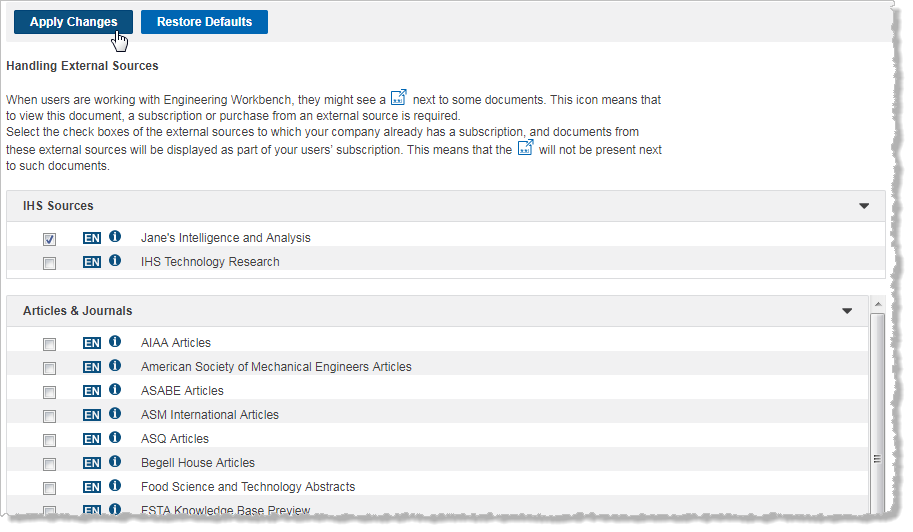
Select the check boxes of the external sources to which your company already has a subscription.
Note: If your company does not have subscriptions to these external sources, and you do not select any of the check boxes, the following icon might be displayed next to documents from these sources.
means a subscription
or purchase from an external source is required to open the document.
This is not a document you can order from Accuris.