Using advanced query tools
To display the  Advanced
Query panel, click Advanced
Query Tools below the
query box.
Advanced
Query panel, click Advanced
Query Tools below the
query box.
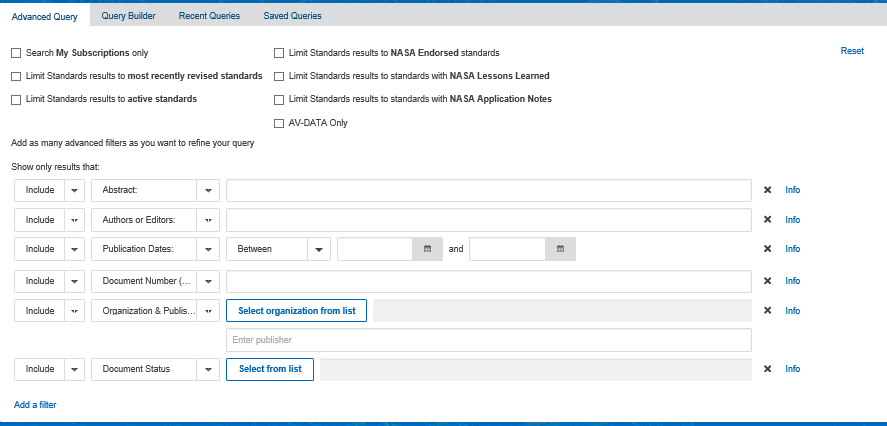
Use the advanced query panel to filter your results by any of the following:
- Abstract
- Authors or editors
- AV Company
- AV Model
- Document Language
- Document number (includes ISBN, ISSN, and ISE Standard Number)
- Document Status
- FSC Codes
- ICS Codes
- AccurisSegment
- Journal or publication
- Keywords or subjects defined by the author of a document
- Modification Dates
- Organization & Publisher
- Posted Date
- Publication Date (formats)
- Site or domain (examples)
- Standard Classes
- Title
To add other filters to the list of filters that are shown by default
- Click Add a filter.
To run a recent query or a saved query
- Click the Recent Queries tab or the Saved Queries tab, and then click one of the queries in the list.
Advanced search can be used to filter documents in the following document sources:
- Codes & Standards
- IHS Sources
- Books
- Articles & Journals
- Patents & Applications
- Regulations
To limit your document sources to your subscriptions, select the Search only my subscriptions check box.
To select a specific value for your advanced filter
- For some of the filters in the Advanced Query panel, you can further narrow your search by selecting one, or more, categories contained within a filter. You can further refine a filter if, when you click on a filter, the Select from list button appears to the right of the filter drop-down list. Click Select from list to further refine this the filtering for your query to one, or more categories within a filter. Click Apply to set your selections.
Filtering results from Codes & Standards
To limit your Codes & Standards search results to the most recently revised Standards, select the Limit Standards results to most recently revised standards check box.
To limit your Codes & Standards search results to active standards, select the Limit Standards results to active standards check box.
Filtering Results from AV-DATA
AV-DATA (aviation data) refers to all documents pertaining to aviation. You must have a subscription to AV-DATA to access related filters (AV-DATA Only, AV Company and AV Model). To limit your search results to only AV-DATA documents, select the AV-DATA Only check box. When you submit your query, only AV-DATA documents related to your query will be returned.
You can additionally filter AV-DATA documents in the advanced query panel by selecting AV Company (documents related to aviation companies) or AV Model (documents related to aircraft models) from the drop-down list of filters.
To view (and search) in the AV Company or AV Model filters
- Select AV Company or AV Model in the drop-down list of filters.
- Click Select from list
- In the dialog box that appears, select the check boxes of the AV Company and/or AV Model document sources you wish to view.
- Click Apply.
- (Optional) enter a query in the main query text box to search for a term in that you want to find in the AV Company or AV Model documents.
- Click
 .
.
Boolean expressions
You can use the following Boolean operators in any field. Boolean operators must be enclosed in angle brackets ( < > ):
- <AND>
- <OR>
- <NOT>
To build your own complex queries with additional Boolean logic, click
Query
Builder, and then type your query in the Query box.
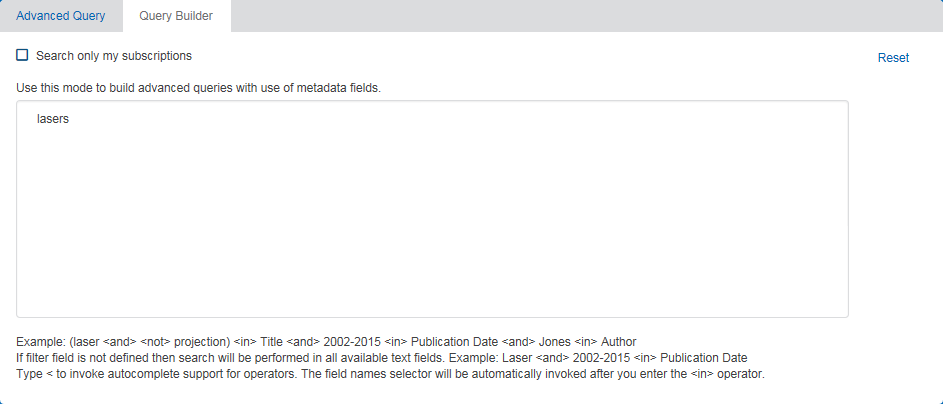
- To specify any operator, type < , and then click the operator that you want to add to your query.
- To specify a metadata field, use the <IN> operator, and then click the field that you want to add to your query. For example, enter <IN> Publication Date.