Selecting your sources in the Advanced Search tool
The Advanced Search tool enables you to select the document sources you want to search in to achieve targeted and improved search results by narrowing the focus of your query to specific categories and document sources.
Select one or more of the following category tabs:
- Codes & Standards
- Accuris Sources
- Books
- Articles & Journals
- Patents & Applications
- Regulations
- My Cloud Sources
- My Corporate Sources
Note: The My Corporate Sources category enables you to target your search to internal sources and related documents that come from your organization (and that are indexed in an Goldfire Server), and is only available (and visible) to users who have access to an Engineering Workbench cloud and the Engineering Workbench hybrid cloud configuration.
Source Details
- To
display information about a source, click
 .
. - Language indicators. Language indicators are shown next to each source. The following language indicators can appear:
|
|
For English sources |
|
|
For French sources |
|
|
For German sources |
|
|
For Japanese sources |
|
|
For Chinese sources |
|
|
For sources containing documents in more than one language |


To select sources
- Select the check boxes for the sources that you want to target
during a search. To choose all the sources in a category, select the
check box in the category tab.
 indicates that all available sources are currently selected.
  indicates that only some, but not all, available sources are currently
selected.
indicates that only some, but not all, available sources are currently
selected.  indicates that none of the available
sources are selected.
indicates that none of the available
sources are selected. - Click Reset to restore your source selection settings to those specified by your Engineering Workbench administrator.
Note: In the Codes & Standards category, sources are grouped alphabetically, by separate Standards Developing Organizations.
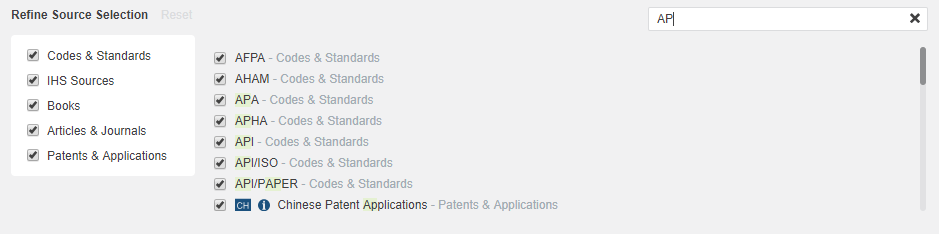
To search for a source
You can search for a specific source, or set of sources, and then refine your source selection in accordance to this search.
- In the Refine Source Selection section of the Advanced Search tool, type the abbreviation of
an organization or a term in the search box. Results of sources that
match your search are
 displayed
as you type.
displayed
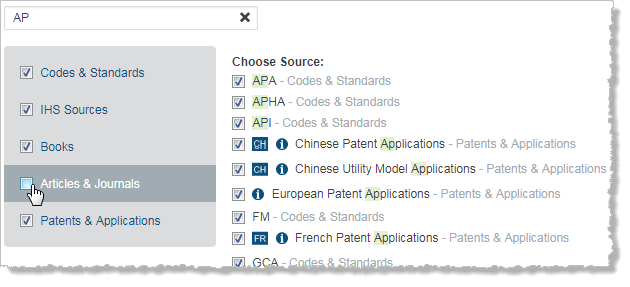
as you type. - You can sort the results of your search by category. Click on each
category to display
- Select the check boxes for the sources in the search results that are relevant to your search, and then click Apply. You have refined your sources to those selected from the source search you conducted.