Viewing search results on the Assignees tab
The Assignees tab displays a table of patent assignees (companies) that develop the technology that is specified in your query.
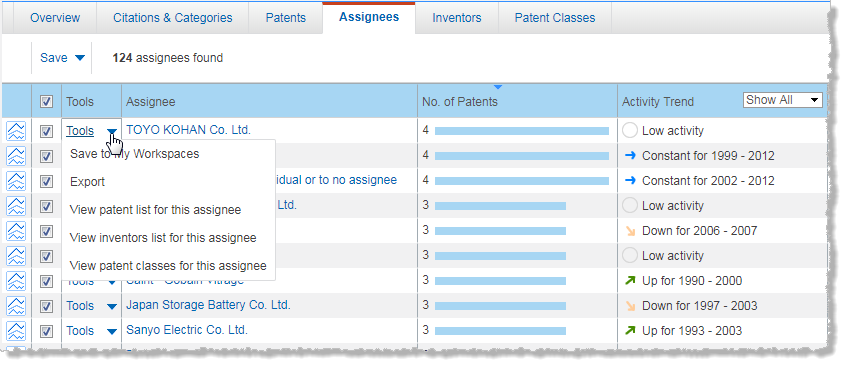
The total number of patents found for this analysis is displayed above the results.
The following columns are including in the Assignees table:
- Assignee: Lists the names of the companies developing and patenting the technology or the company that you are analyzing.
- No. of Patents: Lists the total number of patents issued to each company for the technology or company being analyzed.
- Activity Trend: Classifies the innovation activity of each company as Accelerating, Constant, Declining, or Low, based on the frequency with which the assignee name appears in the patents that are selected for this analysis.
Working with the Assignees table
- To sort information by Assignee, No. of Patents, or Activity Trend, click the corresponding column header.
- To expand an assignee group in the table, click
 .
. - To filter the list of assignees by patenting activity, select the type of activity trend from the list in the Activity Trend column header.
- To view an activity trend chart for a specific assignee, click
 (Activity Trend) for that assignee. This displays a chart of the number of patents issued to that assignee each year (during the date range specified in your query). You can change the type of chart by clicking
  or
or  .
. - To view information for a particular company, click Tools at the left of the assignee name, and then select View patent list for this assignee, View inventors for this assignee, or View patent classes for this assignee.
- To go to a different page, click the desired page number. To navigate the pages sequentially, click the Back or the Forward arrow before and after the page numbers.
Saving patent results
You can save your patent results to the following:
- My Workspaces. You save items to a named project in My Workspaces. (A project is like a folder that contains your saved items.)
- A file on your hard drive, in any of the following formats:
-
-
Excel (.xlsx extension)
-
PDF
-
To save patent results to My Workspaces
- Click Save, and then click Save to My Workspaces.
- In the Save to My Workspaces dialog box, select an existing project, or add a new project.
- If your result set fills more than one page, choose whether to save only the results that are displayed on the current page, or to save all browsable results (between 200 and 1000 results) that are returned on all pages.
- Click Save.
Exporting patent results
Your query is exported along with all the data that is displayed in your results.
To export patent results to a file
- Click Save, and then click Export.
- In the Export Results dialog box, select one of the following file types:
- Excel
- If your result set fills more than one page, choose whether to export only the results that are displayed on the current page, or to export all browsable results (between 200 and 1000 results) that are returned on all pages.
- Click Export.
- Follow the directions that your browser gives you for downloading data to a file.