Working with Smart Compare
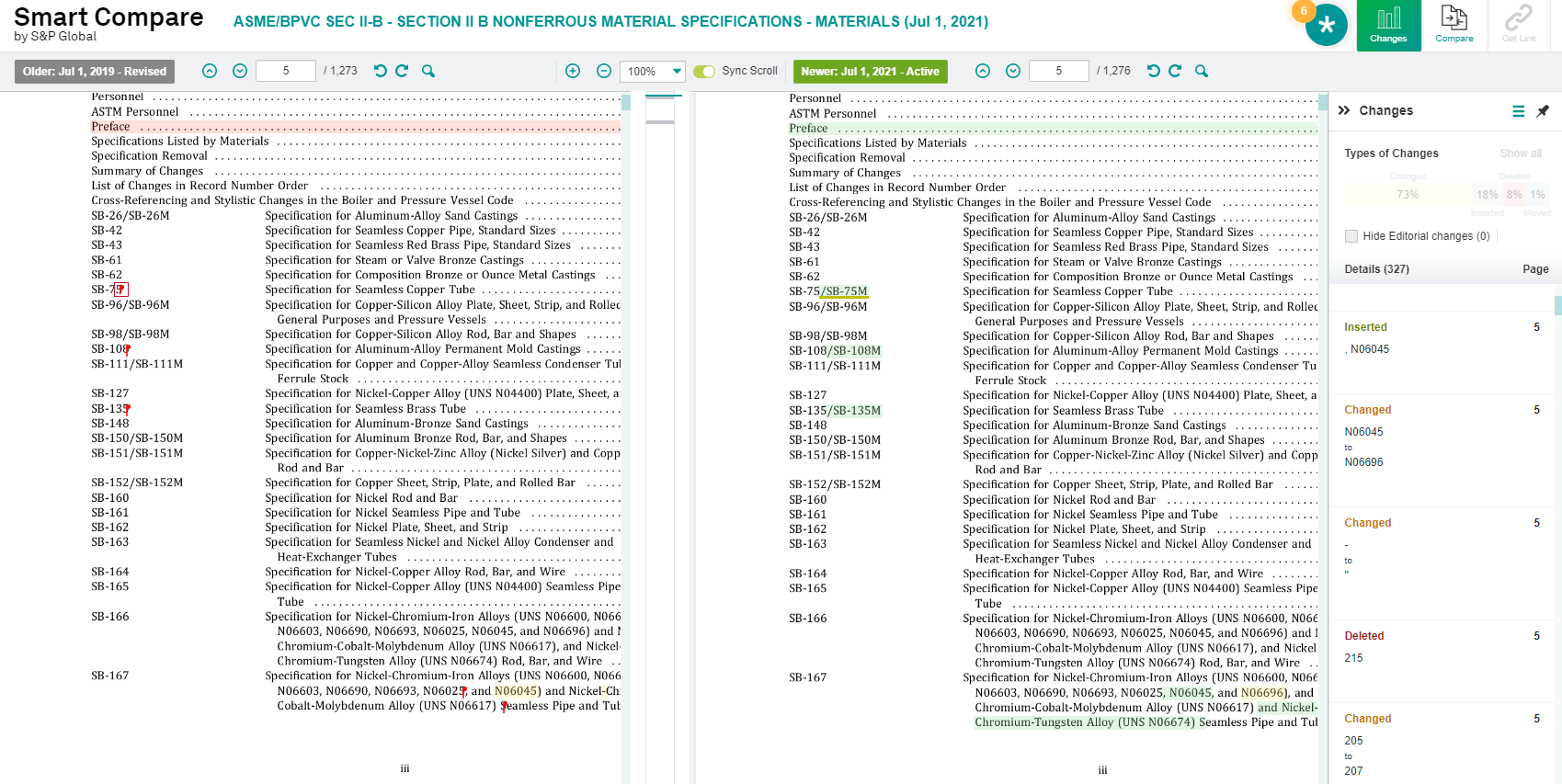
The Smart Compare tool in Engineering Workbench enables and empowers you to see changes between two versions of a document that you are working with. If you have a subscription to two different versions of the same document, you will be able to use Smart Compare to quickly notice and target differences between the two documents.
Note: Smart Compare does not work for NORSOK and NFPA. Nor does it work for non-sequential documents.
You can see which documents are enabled with Smart Compare functionality when you see  next to a document in your search results.
Smart Compare delineates changes between two versions of the same document including changes, deletions, insertions, and editorial changes. When you are working on a side-by-side comparison between two documents using Smart Compare, you can see specific details about the types and locations of changes. The Changes column allows you to see every kind of change as you scroll through the two documents.
Smart Compare Basic versus Smart Compare Premium
All users automatically have access to the Smart Compare Basic work flow, which enables you to compare two documents side-by-side, engage in synchronized scrolling, navigate to different pages, search within standards, and view differences between two versions of the same document. There is also a Smart Compare Premium subscription, which enables you to compare non-sequential standards, apply Get Link to changes for optimizing collaboration, filter types of changes to display, etc.