Get a link for a document
If you want to quickly access a document that you plan to use in the future, or if you want to easily share a document with another user, Engineering Workbench allows you to get a link for documents and ebooks that you can indefinitely use to access a document. Depending on your subscription, your link opens either in the Document or Summary tab of the Document Viewer application. The Get Link feature also provides you with enhanced flexibility in how to get a link for the document or ebook that you are working with: you can specify between getting a link for the most recent version of the document or a specific version of the document. You can also choose to get a link that takes you to a specific section or a particular page in a document, eliminating the need to look for an important section of a document when you work with it in the future.
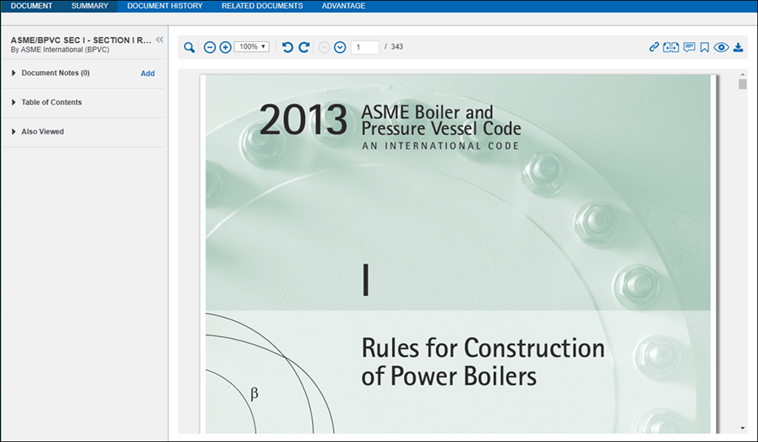
Get a document link in the Document or Summary Tab of the Document Viewer application.
- At
 the top of the Document or Summary tab of the Document, click
  , which opens the Get Link dialog box.
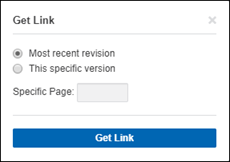
- Choose to get a link to the Most recent revision or This specific version of the document. If you select the Most recent versionoption, this means, that when you use the link in the future, you see the most current version of the document. If the document has been revised in anyway, the link brings you to the most up-to-date version of the document, reflecting any changes between the time you generated the link and when you use it next. You can also get a link to a specific version of the document that you are working with. Select This specific version if you need access a specific version of the document. In this case, even if the document has been subject to revisions, your link brings you to the exact version of the document that you need.
- (Optional) Specify a page number (the document as numbered in accordance to the Document Viewer application), either the page you are currently on or another page, in the document to which the link correlates. When you specify a page number, in the Get Link dialogue box, the link takes you to the exact page of the document when you access the link the future.
- Click Get Link, and Engineering Workbench generates a permanent link that you can use to access your document. This link enables you to access it in the Document Viewer.
- Click Copy to make a copy of the link.
Note: It is possible that your organization has configured security settings in your browser that prevent you from using the Copy button. In this case, you can highlight the link that is generated by Engineering Workbench and manually copy it.
Note: When you get a link that correlates to a specific document, and you want to keep track of it for future use, you must manage it outside of Engineering Workbench . If you want to delete a link you create, contact Accuris Customer Care to do so.
Get a link that takes you to a specific section of the document
When you are working in a document and you want to return to or refer to a specific section of it in the future, you can get a link that leads you exactly to this section of the document. In the Document tab of the Document Viewer application:
- Highlight a specific section of the document
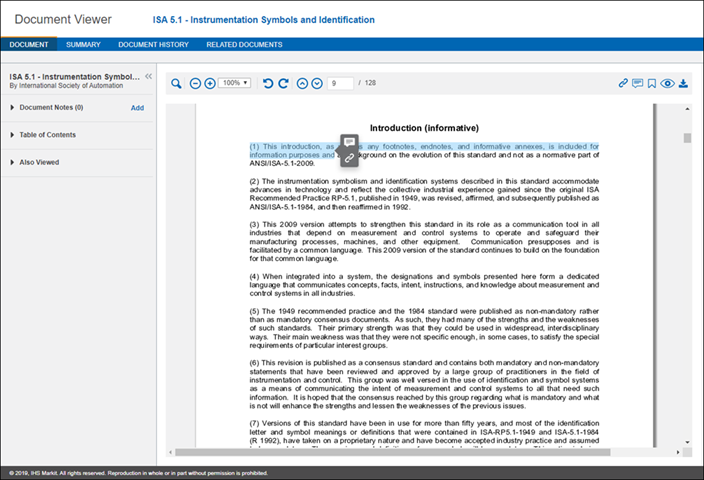
- Click
- Click Copy to make a copy of the link.
Note: It is possible that your organization has configured security settings in your browser that prevent you from using the Copy button. In this case, you can highlight the link that is generated by
When you use this link in the future, Engineering Workbench takes you to the exact section of document that you have highlighted.
Get a link to a document summary
When you don't have access to a document, but still want to get a link, Engineering Workbench enables you to get a link to a document summary. If you create such a link, and secure full access to this document at a later time, this link will take you to the full version of the document.
- In the Summary Window, click
- In the Get Link dialog box, select between the Most recent revision or This specific version of the document summary.
- Click Get Link.
- Click Copy to make a copy of the link.
Note: It is possible that your organization has configured security settings in your browser that prevent the Copy button from working. In this case, you can highlight the link that is generated by Engineering Workbench and manually copy it.
Sharing your document links with others
You can share the links you create to
- If the user is logged into Engineering Workbench and has a subscription to the document, the link should take them directly to the document.
- If the user is logged into
- If the user has an Engineering Workbench account, and tries to access the link when they are not logged in, they are taken to a log in page, where they are prompted to log in. Once the user logs into Engineering Workbench , and clicks on the shared link, they can access the document.
- If the user does not have an