Viewing patent references as a graph
The Patent References Graph tab displays an  interactive patent references map for the selected patent. Information about this focal patent is listed at the top, including its Publication Number, Title, and Assignees (companies).
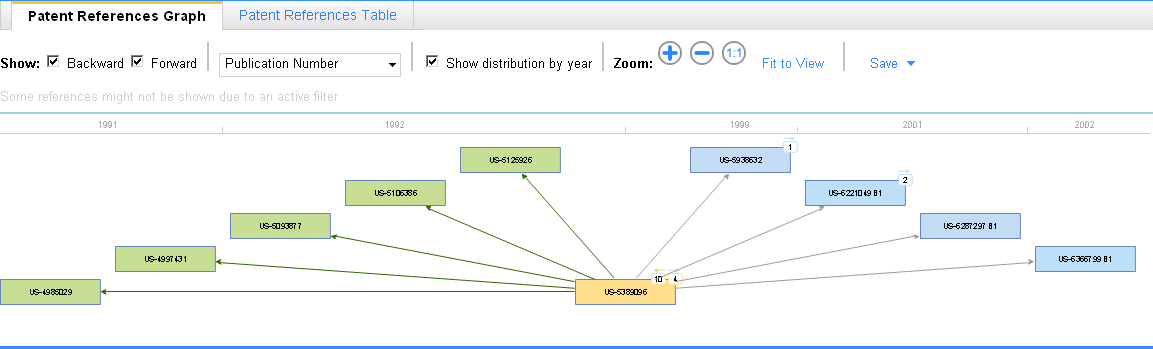
A forward references map is generated by default, which shows patents that directly reference the focal patent. To display a backward references map, which shows the patents that are directly referenced by the focal patent as prior art, click Backward.
The patent references graph displays up to 90 references. If the total number of references exceeds 90, the patent references table is displayed.
By default, the patent references graph shows only those patents that directly reference (or that are directly referenced by) the focal patent. If any of these patents cite (or are cited by) other patents, a number is shown in a square box at the top of the patent reference. For forward references, this number indicates the total number of patents that refer to the target patent. For backward references, this number indicates the total number of prior art patents that the patent cites.
Filtering patent references
You can filter which patent references you want to include in the patent references map. You can filter patent references by the following criteria:
- Time frame
- Assignees
- Inventors
- US classes
- IPC classes
These filters are applied to all forward and backward references of your focal patent.
Viewing options for the patent references graph
- Show: Click Forward to view patents that directly reference a given patent. Click Backward to view patents listed as prior art by a given base patent.
Click one of the following on the menu at the right of the Show list to specify the information each patent reference node should display:
Application Date
Application Number
Assignee
Inventor
Publication Date
Publication Number
Title
- Show distribution by year: When selected, referenced patents are clustered on the screen chronologically according to the year in which they were issued. The patents are displayed under a horizontal date line, which is marked in Publication Date years. If this check box is left clear, the referenced patents are clustered on the screen to display their relationships more clearly.
- Zoom: To enlarge the patent references map, click
 . To reduce the patent references map, click
  . To return the patent references map to its original size, click
  .
. - Fit to View: Click this option to reduce or enlarge the map so that it fits the screen.
Working with the patent references graph
To view detailed information about a patent reference
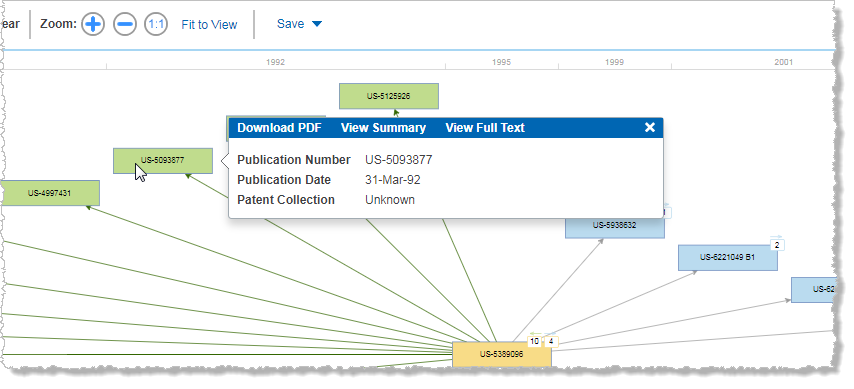
To expand the references map using any patent reference node
To hide a branch in the references map
- Point to a patent reference node, and then click Hide Forward Reference or Hide Backward Reference on the Patent Information Card.
To download a PDF of a patent
- Point to a patent reference node, and then click Download PDF on the Patent Information Card.
To view a patent summary
- Point to a patent reference node, and then click View Summary on the Patent Information Card.
To view the full text of a patent
- Point to a patent reference node, and then click View Full Text on the Patent Information Card.
To save the patent references map to My Workspaces
- Click Save at the top of the patent references graph, and then click Save to My Workspaces.
- In the Save Graph dialog box, specify an existing project, or add a new project.
- Click Save.
To export the patent references map to a file
- Click Save, and then click Export.
To print the patent references map
- Click Print on the File menu, choose the appropriate printing options, and then click OK.
 When printed, your patent references map is reduced to fit on an 8.5" x 11" page. For maps with many references, you might want to print the patent references table instead.